9.1. AAC#004: Could not check for updates
Introduced Version |
Fixed Version |
|---|---|
4.0.x |
4.1.5 |
There is currently a bug in the Analysis Cockpit where the update module does not use the proxy configuration. This can lead to the Analysis Cockpit not being able to check for or install updates. The changelog might also not be displayed correctly.
You will receive one of the following errors when trying to check for updates (or the check will just hang):
[ERR] could not download Analysis Cockpit
ERROR: exit status 1 (Job for asgard-analysis-cockpit-download.service
failed because the control process exited with error code.\n
See "systemctl status asgard-analysis-cockpit-download.service" and
"journalctl -xeu asgard-analysis-cockpit-download.service" for details.\n)
[ERR] could not get ASGARD changelog ERROR: exit status 1
9.1.1. AAC#004: Workaround
This issue is fixed in the newest version, which you will not be able to install since you cannot check for or download updates. To fix this issue, you have to connect to your Analysis Cockpit via SSH and create the following file:
nextron@cockpit:~$ sudo nano /etc/apt/apt.conf.d/90proxy
Acquire::http::Proxy "http://proxy:port";
Acquire::https::Proxy "http://proxy:port";
Make sure to replace http://proxy:port with your actual
proxy configuration. Once the file is created, you can try
to check for updates again. Install the newest version of the
Analysis Cockpit and remove the file afterwards (if the update
was successful):
nextron@cockpit:~$ sudo rm /etc/apt/apt.conf.d/90proxy
9.2. AAC#003: [WAR] could not create case
Introduced Version |
Fixed Version |
|---|---|
4.0.10 |
4.0.12 |
There is currently a bug in the Analysis Cockpit when creating cases, if the following conditions are given:
Baseline view with a limited time frame (e.g. 30 days)
Trying to create a
Condition Case
When you try to create a case with the above criteria given, you will receive the following error:
[WAR] could not create case ERROR: can not create case with more than one source (query / condition / regex) set
9.2.1. AAC#003: Workaround
While we are working on the fix, you can do the following to avoid the above error:
Change the time frame to
All timein your baseline view
9.3. AAC#002: Scan stuck at Status "Unknown"
Introduced Version |
Fixed Version |
|---|---|
4.0.10 |
4.0.11 |
There is currently a bug in the Analysis Cockpit which prevents some Scans from being imported correctly.
This is caused by very big events (a single event bigger than 64 Kb), which will cause the parser to error. The Analysis Cockpit can never finish importing this Scan.
9.3.1. AAC#002: Fix
We are currently testing the fix, which will skip larger events and finish importing the scan logs.
You will also have the possibility to set the maximum size of a single log line in the advanced options, once the fix is released.
You will additionally see failed Log imports in the Dashboard of your Analysis Cockpit.
9.3.2. AAC#002: Check
You can check if one of your scan logs is effected if the following conditions are met:
You will see a scan which is in the Status Unknown
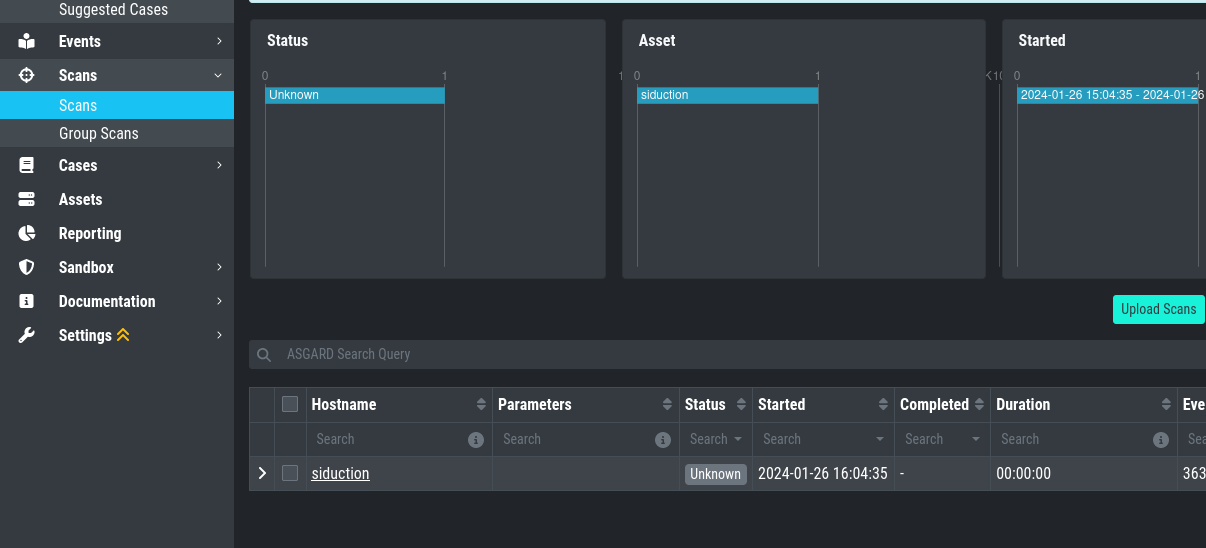
When you connect to your Analysis Cockpit via SSH and enter a root session, you can execute the following command to see if the error occurred on one or more log files:
root@analysis:# grep -R "ERROR: bufio.Scanner: token too long" /var/log/asgard-analysis-cockpit
Jan 26 16:18:49 analysis analysiscockpit4[29459]: 2024-01-26T15:18:49Z [ERR] could not read events from file PATH: /var/lib/asgard-analysis-cockpit/events/upload_siduction_thor_2024-01-06.txt ERROR: bufio.Scanner: token too long
You should see from the above output which log had problems, which should also be reflected in the filename:
root@analysis:# ls /var/lib/asgard-analysis-cockpit/events
upload_siduction_thor_2024-01-06.txt.problem
The file has the .problem suffix, which indicates
a problem during the import.
Once you installed the update you can re-import the
failed scan logs. You can either upload them manually
again, or rename the files from the output above (remove
the .problem suffix).
9.4. AAC#001: Could not get table data: Data too large
This issue is related to ElasticSearch, which stores your Analysis Cockpit's events. Elasticsearch calculates the required RAM for operations before executing them.
The below error might occur on complex searches or aggregations (e.g. for the graphs in the baselining view). To fix this issue, you have to increase the RAM of your Analysis Cockpit and reconfigure ElasticSearch to actually use more RAM.
9.4.1. AAC#001: Fix
To actually fix the problem, you have to allocate more RAM to your Analysis Cockpit. You should be able to do this via your hypervisor.
To increase heap space for ElasticSearch, edit the following configuration file on your Analysis Cockpit:
nextron@cockpit:~$ sudoedit /etc/elasticsearch/jvm.options.d/10-cockpit.options
You should see the following default values:
-Xms2g
-Xmx2g
Xms represents the initial size of total heap space
Xmx represents the maximum size of total heap space
The 2g part of the values indicates the heap space in gigabytes.
We advise to use 50% of your system's memory for ElasticSearch. On a
system with a maximum of 8 GB of RAM, this would be 4g:
-Xms4g
-Xmx4g
After you saved your changes, restart the elasticsearch service (this could take a few seconds!):
nextron@cockpit:~$ sudo systemctl restart elasticsearch.service
Make sure the service is in active (running) state after you
restarted it:
nextron@cockpit:~$ sudo systemctl status elasticsearch.service